Live Systems
Live Diagnostic Toolkits Still Maintained
Half the toolkits people still recommend stopped shipping years ago. This page records what was checked and when it was checked.
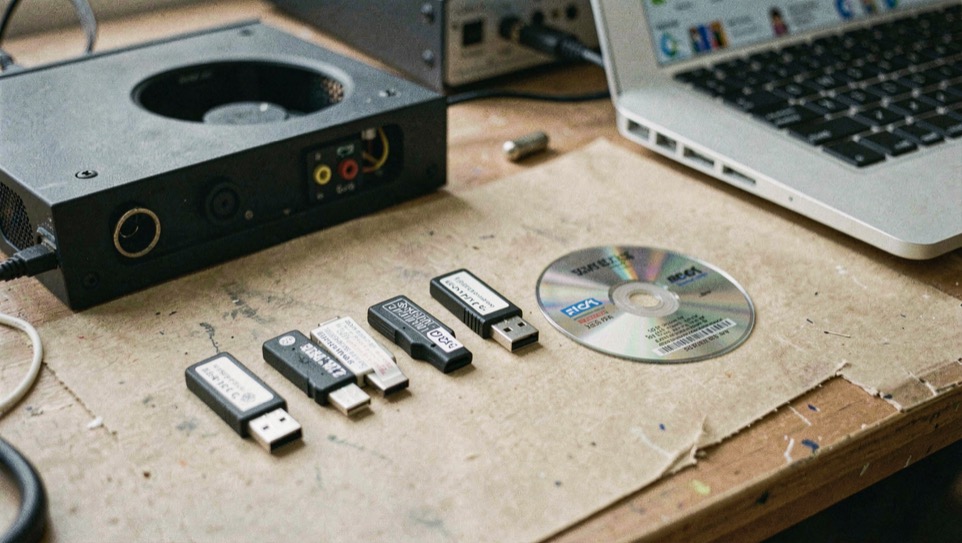
A rescue toolkit is a promise made in advance: this stick will boot when the installed system will not, and it will carry what the repair needs. Whether a project still keeps that promise is not a matter of reputation. It shows up as a release with a date on it, a home for the source that still answers, and a tool list that matches the machines people actually own. This page holds four bootable toolkits against those signs and reports what each one is built on, because the base decides which filesystems open, which network stacks arrive, and what a package manager can add after the fact.
What has to be true before a toolkit counts as maintained?
Two artifacts settle it. The first is a release carrying a date, published where the project itself publishes. The second is a working home for the source and the discussion, at an address the project vouches for. Everything else is indirect: a directory entry, a forum thread, a write-up by an admirer. A directory records a state at a date and then keeps that record after the state has changed. The LiveCD List entry for Overclockix still read State: Active when its page was updated in December 2013, which was accurate then and settles nothing today; ArchiveOS noted in 2019 that the project's site was not active while keeping the version line from 2015. Neither entry is wrong. Neither tells you what is happening this month. The case for running any of this from outside the installed system is the desk's page on why the diagnosis runs from outside; the question here is narrower, which of these kits are still being worked on.
Finnix answers in public. Its front page calls it the original utility live Linux distribution, offers version 251 as a 577 MiB AMD64 ISO image released November 17, 2025, and promises a root prompt seconds after boot with hundreds of utilities for recovery, maintenance and testing. The project also moved all of its infrastructure from GitHub to a Forgejo forge as of May 2026, keeping the old repositories as push mirrors and naming the forge canonical, with documentation, discussions and the issue tracker in the same place. And it names its owner: Finnix is part of Velociraptor Aerospace Dynamics LLC, a Nevada company belonging to Ryan Finnie, and the page states plainly that it is not a nonprofit. That last sentence is not trivia. A maintained tool has someone holding the pen, and this one says who.
What each one is built on, and why the base matters
SystemRescue, formerly known as SystemRescueCd, frames its job as the machine after the crash: a bootable environment for administering or repairing a system and its data, with no installation required, from an optical drive or a USB stick, and optional installation to the hard disk for those who want it. Its homepage lists the filesystems its kernel expects to meet, ext4, xfs, btrfs, vfat and ntfs, plus Samba and NFS across a network, and says the same image serves Linux and Windows machines, desktops and servers. The page also links a manual, a quick start guide, a forum, and two long guides of its own, one on disk partitioning and one on the LVM volume manager. What the page does not state in the text read for this piece is the distribution it is built on; the project's Linux system rescue toolkit pages carry that story further, along with the package list.
GParted Live states its base in one clause: Debian live. The clause does real work. It explains the account model before you meet it, since the page documents a default user account with root reached through sudo, and it names the family the tools inside were assembled against, though the page read here gives no Debian release number. The page read here documents four install targets, CD, USB, PXE server and hard disk, and says it exists to put the latest GParted on an x86 machine. Its menu carries a News section, which is where a reader who needs a date should look, because the installation and package tables carry none. Overclockix changed bases mid life: a Knoppix live CD at the start, a Debian one after the 2011 revival.
| Toolkit | Base, as stated | Boot media, as stated | Dated release in the pages read |
|---|---|---|---|
| SystemRescue | Not named on the homepage | CD/DVD drive or USB stick, or installed to disk | None in the homepage text |
| Finnix | Not named on the front page | USB flash drive or CD | 251, November 17, 2025 |
| GParted Live | Debian live | CD, USB, PXE server, hard disk | None in the page read; News section in the menu |
| Overclockix | Knoppix, then Debian from 2011 | CD and USB flash drive | 7.8.0, June 1, 2015; status Discontinued |
What does each one carry when the machine is already sick?
The passengers decide the stick, more than the base does. SystemRescue's list reads like a triage sequence. GNU Parted and GParted for the partition table, with GParted as the graphical face of the same library. FSArchiver, described as serving both system and data recovery. ddrescue, for the drive that is already failing: it attempts a copy of a block device that has hardware errors and can fill the spots that will not read with a pattern the operator chooses, so the dying drive is read once and the re-reads happen on the copy. TestDisk, to check and undelete partitions across reiserfs, ntfs, fat32, ext3 and ext4 among others. Ntfs3g for read and write access to Windows partitions. Rsync and the network tools for moving the rescued data somewhere else. And Memtest, to which the project's own list attaches a judgment: the first thing to test when a machine crashes or misbehaves for no reason the system explains. What a clean run of it does and does not cover is the desk's separate page on what a memory pass covers.
GParted Live travels lighter and more pointed. Its package table includes gsmartcontrol for hard disk and SSD health inspection, partclone and partimage for compressed partition images, fsarchiver again, gpart as an older recovery tool for msdos partition tables, grub for restoring a GRUB 2 boot loader, and hexedit. The page's own caution belongs in the sentence about the operation it guards: make a whole disk or partition image backup before you resize or move anything, because a move interrupted partway does not offer to undo itself, and the page names Clonezilla, doClone, FSArchiver, G4L, g4u, Partimage and Partclone as the free tools that make such an image. The Overclockix list was aimed elsewhere, at load rather than repair; Phoronix's 2013 coverage names MPrime and Y-Cruncher among its tools.
What does the end of maintenance look like?
Overclockix is the counterexample, and it is also this domain's own name, which is why the desk is strict about what it claims. DistroWatch's description has the shape of it: a Knoppix based live CD carrying tools for network security, low-level hardware tweaking, burn-in applications and distributed computing clients, started in 2003, dormant in 2005, revived in 2011 on a Debian base and aimed at overclockers for stress testing and as a general Linux toolkit. The same page marks the status Discontinued and dates the last release, 7.8.0, June 1, 2015. Its version table is worth a second glance for a reason that has nothing to do with maintenance: it lists 3.79 after 3.8, because it sorts by release date rather than by number. The repository's last push is May 31, 2015. Phoronix, covering the 2013 release, had already noted the narrowing: anyone can take the live CD of a favorite distribution and install a preferred test suite on it, which leaves a fixed-image project with less that is distinctly its own.
So this site republishes the release record and serves none of it: no disk images, no checksums, no torrents, no mirrors. It is not the Overclockix project, does not maintain it and does not speak for it. A reader who wants the project itself is sent to its repository, and a reader who wants a maintained toolkit is sent to a dated release.
Choosing the stick by the failure in front of you
Match the kit to the suspected subsystem, not to the brand on the label. A partition that will not mount points at the partitioning and undelete tools. A machine that crashes under load points at the memory test first. A drive that has started making noise points at a copy tool, and at reading what the drive reports about itself before trusting it. Then let the date break any tie between two kits that carry the same tool. The gesture worth making now, while nothing is broken: pick the one stick you want to find in the drawer, confirm the release date on the project's own pages, and spend an evening on building the stick before it is needed. A toolkit chosen after a crash is chosen under pressure, by someone reading a screen in a bad mood.
Before you commit anything to a stick
- Take the release date from the project's own pages, not from a directory; a directory preserves the state it found and does not update it.
- Note the base and the architecture, since they decide which filesystems the image opens and which machines it boots.
- Match the toolkit to the failure you expect: partition repair, memory, drive imaging and drive self reporting are different passengers.
- Write the build date on the stick itself. The stick outlives the page you read, and next year's you will want to know how old the tools are.
Where this goes wrong
Trusting a third party listing over the project's own pages. One long standing live CD list sent its Download link for Overclockix to a forum thread rather than to the project, and an archive site was still carrying the 2015 version line in 2019 next to the note that the site was inactive. Neither entry lied. Both were old, and old and wrong look identical from the outside.
Moving or resizing a partition from a live environment with no image behind it. The GParted Live page puts the caution in its own instructions and names the free imaging tools that satisfy it. No bootable toolkit can put back bytes that were never written anywhere else.
Reading a maintenance signal backwards. A project that moves forges and keeps the old repositories as mirrors is doing housekeeping, not leaving. A project that still boots is not therefore still maintained: Overclockix boots, and its last release carries a 2015 date.
system-rescue.org
- Home of SystemRescue, formerly SystemRescueCd, a Linux system rescue toolkit distributed as a bootable medium that needs no installation and can also be installed to the hard disk.
- The site publishes a quick start guide, a manual, a book, a forum, and guides on disk partitioning and on the LVM volume manager, with a short system tools page and a detailed package list.
- Its tool list covers partitioning with GNU Parted and GParted, archiving and recovery with FSArchiver, ddrescue and TestDisk, NTFS access through Ntfs3g, memory testing with Memtest, and rsync with network tools for backups.
- The project states that its sources are on GitLab and are licensed under GPLv3.